EventLens
A read-only command-line tool that turns Windows event logs into a ranked, plain-English report of crashes, failing hardware, and broken services, with a next step for each.
Problem
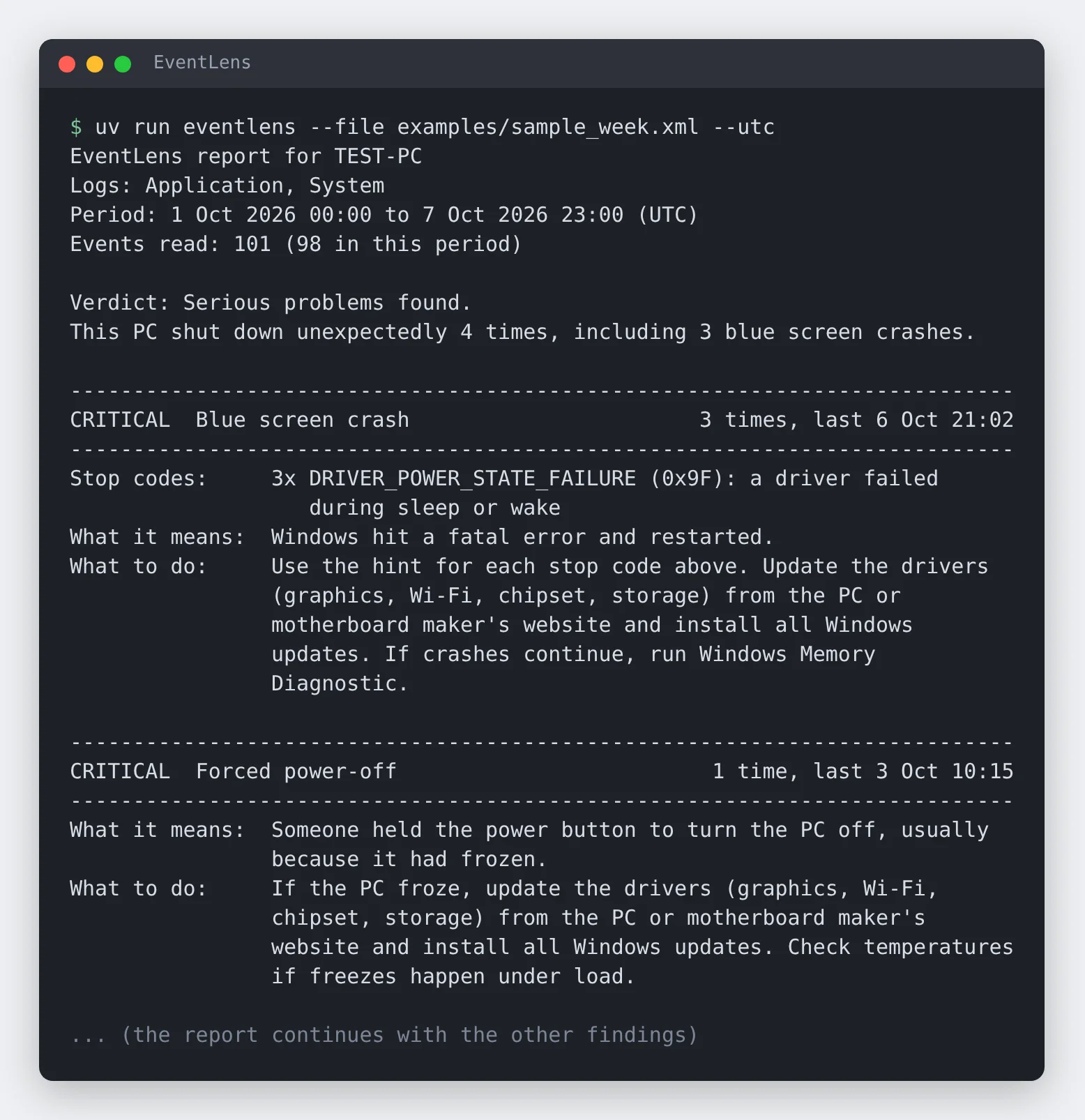
Windows records nearly everything that goes wrong on a PC, but Event Viewer presents it as thousands of entries with cryptic sources and numeric IDs, and most of them are harmless. “Why does my laptop keep restarting?” is a common help desk question, and answering it means knowing which handful of events matter. EventLens does that first read: it picks out the entries that matter, groups the repeats, ranks them by severity, and says what each one means and what to do next.
Approach
EventLens reads exported .evtx and Event Viewer .xml files on Windows, macOS, or Linux, and reads live System and Application logs through Windows’ built-in wevtutil. Each event is matched by source and ID against a catalog of rules. A rule holds a plain-English title, what the event means, what to do about it, and how to pull out a useful detail such as the crashing app, the failed service, or the update that didn’t install.
Matched events are grouped into findings with a count and first and last times, then sorted into five levels from Critical to Info. The catalog covers 31 event types and 12 common blue screen stop codes. Anything it doesn’t recognise is still listed by source and ID instead of being dropped.
The report fits in 75 columns so it pastes cleanly into an email or ticket. It can also be written as Markdown for tickets or JSON for scripts, and --fail-on high returns exit code 1 when a serious problem is found, so it can run inside a larger script. Optional extras add a boot and shutdown timeline, battery wear from powercfg /batteryreport, and sleep problems from powercfg /sleepstudy.
Decisions
Count one crash once. A single crash leaves two or three events when the PC comes back up: Kernel-Power 41, EventLog 6008, and, for a blue screen, a bugcheck report. Listing them separately would triple-count it. Different crash events within 10 minutes on the same computer become one incident, classified as a blue screen, a forced power-off, or a sudden power loss. The same event appearing twice always starts a new incident, so two crashes close together still count as two.
Read only, offline only. EventLens never changes the machine and never connects to the internet. That makes it safe to run on someone else’s PC, and it means a friend or user can export a log and send it over to be read anywhere.
Separate harmless noise. Planned restarts, the well-known DCOM 10016 warnings, and services that routinely log errors are listed under “Normal activity” instead of as faults, so the report doesn’t alarm anyone over events that don’t need action.
Keep the catalog as data. The rules moved from Python into a catalog.toml file, so most new events need no code change. Only an event that needs real parsing logic requires a new extractor.
Result
The project has 387 automated tests that run on Windows, macOS, and Linux with Python 3.11 and 3.13 on every change, including a check that compares the full report for the sample week against a saved copy. On GitHub’s Windows runners, CI reads the real System log through wevtutil. EventLens was also run against a real 1,881-event Windows 10 System log, and service names, drive paths, and update titles came through correctly.
Current limits
Live mode has only run on GitHub’s Windows runners, which have administrator rights, not on a normal home PC, a standard user account, or a non-English Windows. Crash handling is tested with made-up events that follow the documented layouts rather than logs from a PC that actually crashed. The battery and sleep features have not yet been validated on real laptop data. Severity is a rule of thumb, and the catalog is deliberately small, so it will miss problems recorded by events it doesn’t know yet.