OSI Model — The 7 Layers
| Category: Networking | Updated: 2026-02-15 |
The Open Systems Interconnection (OSI) model is a conceptual framework that standardises how network communication is structured. It divides networking into seven distinct layers, each with a specific responsibility.
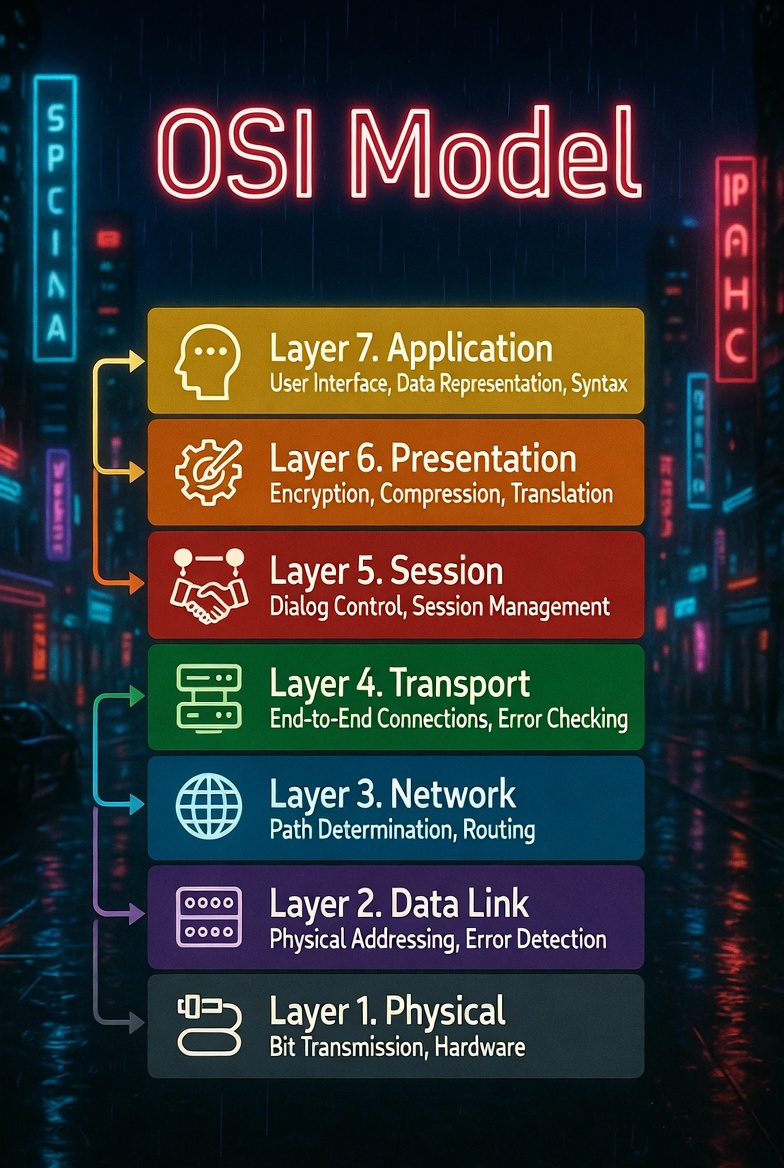
Quick Reference
Layer 7  Application    ← User-facing (HTTP, DNS, FTP)
Layer 6  Presentation   ← Data format & encryption (SSL/TLS, JPEG)
Layer 5  Session        ← Connection management (NetBIOS, RPC)
Layer 4  Transport      ← Reliable delivery (TCP, UDP)
Layer 3  Network        ← Routing & addressing (IP, ICMP)
Layer 2  Data Link      ← Framing & MAC addressing (Ethernet, Wi-Fi)
Layer 1  Physical       ← Bits on the wire (cables, signals)
Layer 1 — Physical
The lowest layer. Deals with the physical transmission of raw bits over a communication channel.
| Aspect | Detail |
|---|---|
| Unit | Bit |
| Function | Transmits raw binary data over physical media |
| Examples | Ethernet cables (Cat5e/6), fibre optic, radio waves, USB |
| Devices | Hubs, repeaters, network adapters, cables |
Key concepts:
- Voltage levels, signal timing, data rates
- Connector types (RJ45, SFP, coaxial)
- Transmission modes: simplex, half-duplex, full-duplex
- Encoding schemes (Manchester, NRZ)
Layer 2 — Data Link
Provides node-to-node data transfer and handles error detection at the frame level. Split into two sub-layers: LLC (Logical Link Control) and MAC (Media Access Control).
| Aspect | Detail |
|---|---|
| Unit | Frame |
| Function | Framing, MAC addressing, error detection |
| Protocols | Ethernet (802.3), Wi-Fi (802.11), PPP, ARP |
| Devices | Switches, bridges, NICs |
Key concepts:
- MAC addresses (48-bit hardware addresses, e.g.
AA:BB:CC:DD:EE:FF) - Frame structure: preamble, destination MAC, source MAC, type, payload, FCS
- Error detection via CRC (Cyclic Redundancy Check)
- VLANs (802.1Q) for logical network segmentation
- STP (Spanning Tree Protocol) to prevent switching loops
Layer 3 — Network
Handles routing and logical addressing. Determines the best path for data to travel from source to destination across multiple networks.
| Aspect | Detail |
|---|---|
| Unit | Packet |
| Function | Logical addressing, routing, path determination |
| Protocols | IPv4, IPv6, ICMP, OSPF, BGP, RIP |
| Devices | Routers, Layer 3 switches |
Key concepts:
- IP addressing (IPv4: 32-bit, e.g.
192.168.1.1; IPv6: 128-bit) - Subnetting and CIDR notation (
/24,/16, etc.) - Routing tables and routing protocols (static vs dynamic)
- TTL (Time To Live) to prevent infinite loops
- NAT (Network Address Translation) for private-to-public IP mapping
- Fragmentation and reassembly of packets
Layer 4 — Transport
Ensures reliable (or fast) end-to-end data delivery between applications. Manages flow control, segmentation, and error recovery.
| Aspect | Detail |
|---|---|
| Unit | Segment (TCP) / Datagram (UDP) |
| Function | End-to-end delivery, flow control, error recovery |
| Protocols | TCP, UDP, SCTP |
| Concepts | Ports, sockets, windowing |
TCP vs UDP
| Feature | TCP | UDP |
|---|---|---|
| Connection | Connection-oriented (3-way handshake) | Connectionless |
| Reliability | Guaranteed delivery, ordering | Best-effort, no guarantees |
| Speed | Slower (overhead) | Faster (minimal overhead) |
| Use cases | Web (HTTP), email, file transfer | DNS, streaming, gaming, VoIP |
| Header size | 20-60 bytes | 8 bytes |
Key concepts:
- Port numbers (0-65535): well-known (0-1023), registered (1024-49151), dynamic (49152-65535)
- TCP three-way handshake: SYN → SYN-ACK → ACK
- Flow control via sliding window
- Congestion control (slow start, congestion avoidance)
Layer 5 — Session
Manages sessions (connections) between applications. Handles setup, maintenance, and teardown of communication sessions.
| Aspect | Detail |
|---|---|
| Unit | Data |
| Function | Session establishment, maintenance, termination |
| Protocols | NetBIOS, RPC, PPTP, SMB |
| Concepts | Session tokens, synchronisation, checkpointing |
Key concepts:
- Session management: opening, maintaining, closing connections
- Synchronisation points for long data transfers (recovery after failure)
- Dialog control: full-duplex vs half-duplex communication
- Authentication and authorisation at session level
Layer 6 — Presentation
Translates data between the application layer and the network. Handles data formatting, encryption/decryption, and compression.
| Aspect | Detail |
|---|---|
| Unit | Data |
| Function | Data translation, encryption, compression |
| Protocols/Standards | SSL/TLS, JPEG, GIF, PNG, MPEG, ASCII, Unicode |
| Concepts | Serialisation, encoding, character sets |
Key concepts:
- Data format translation (e.g. EBCDIC ↔ ASCII)
- Encryption/decryption (SSL/TLS handshake happens here conceptually)
- Data compression to reduce bandwidth
- Serialisation formats (JSON, XML, Protocol Buffers)
Layer 7 — Application
The layer closest to the end user. Provides network services directly to user applications.
| Aspect | Detail |
|---|---|
| Unit | Data |
| Function | Network services for applications |
| Protocols | HTTP/HTTPS, FTP, SMTP, DNS, SSH, DHCP, SNMP, LDAP |
| Concepts | APIs, web services, email clients |
Key concepts:
- HTTP methods: GET, POST, PUT, DELETE, PATCH
- DNS resolution: domain name → IP address
- DHCP: automatic IP assignment
- SMTP/IMAP/POP3: email protocols
- SSH: secure remote access
- REST APIs and web services
Mnemonic
A common way to remember the layers from bottom to top:
Please Do Not Throw Sausage Pizza Away
| Letter | Layer |
|---|---|
| P | Physical |
| D | Data Link |
| N | Network |
| T | Transport |
| S | Session |
| P | Presentation |
| A | Application |
OSI vs TCP/IP Model
The TCP/IP model is the practical implementation used on the internet. It combines several OSI layers:
OSI Model              TCP/IP Model
─────────              ────────────
7. Application    ┐
6. Presentation   ├──→  Application
5. Session        ┘
4. Transport      ───→  Transport
3. Network        ───→  Internet
2. Data Link      ┐
1. Physical       ┘──→  Network Access
Troubleshooting by Layer
When diagnosing network issues, work from the bottom up:
- Physical — Is the cable plugged in? Link light on?
- Data Link — Can you see MAC addresses? ARP working?
- Network — Can you ping the gateway? Routes correct?
- Transport — Is the port open? Firewall blocking?
- Session — Can a session be established?
- Presentation — Certificate errors? Encoding issues?
- Application — Does the app respond? Correct config?
# Layer 1: check interface status
ip link show

# Layer 2: check ARP table
arp -a

# Layer 3: test connectivity
ping 8.8.8.8
traceroute 8.8.8.8

# Layer 4: test port connectivity
nc -zv example.com 443
ss -tulnp

# Layer 7: test application
curl -I https://example.com